User Components Constraints
By default, you can add a user component to any object in the scene. However, you can restrict which objects can have a specific user component. For this purpose, we've introduced user component constraints.
User component constraints work similarly to Script Node constraints. We recommend taking a look at that guide to better understand how constraints work in general.
To define the constraints for a user component, we've created a new section in the user component editor called Component Constraints:
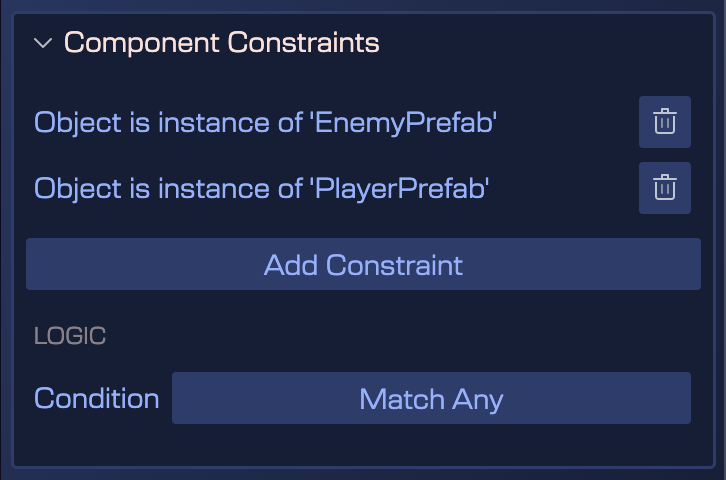
The image above shows the constraints for the HealthComp user component. As you can see, this can only be added to objects that are instances of the EnemyPrefab or PlayerPrefab class.
To add a constraint, click the Add Constraint button. A menu will open where you can select the type of constraint you want to add:
- Object has tag: Restricts the user component to objects that have a specific prefab tag. Learn more about prefab tags.
- Object is instance of: Restricts the user component to objects that are instances of a specific class.
Now, all of these constraints are combined with a Match Any or Match All logical operator. This means that you can add multiple constraints, and the user component will be applied if at least one of the constraints is true (Match Any) or if all of the constraints are true (Match All).
Unlike Script Node constraints, user component constraints are not inherited, since user components do not have an inheritance hierarchy.